
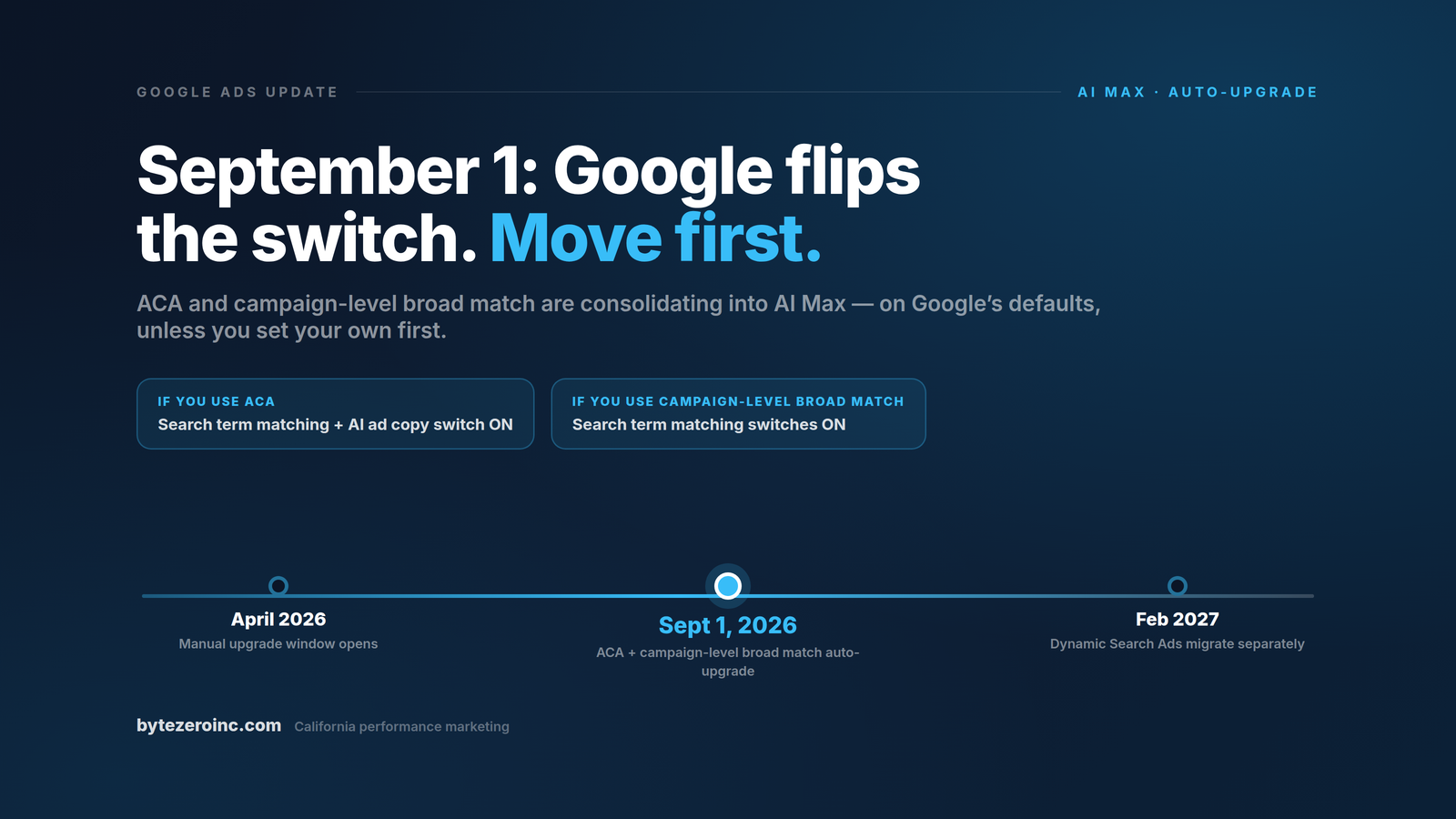
Google has notified advertisers that starting September 1, 2026, eligible Search campaigns will be automatically upgraded to AI Max — its consolidated, machine-led campaign layer for Search.
If your account uses Automatically Created Assets (ACA) or the campaign-level broad match setting, Google will make the transition for you. Google says the upgrade will closely mirror your existing setup. But automated migration defaults are configured to maximise eligibility and impression volume, and that is not the same thing as being configured for your margin.
Here is the distinction that should drive every decision you make between now and September 1: expanded reach is Google's primary metric. Profitable growth is yours.
At ByteZero we manage paid search campaigns for California businesses in some of the most expensive click markets in the country — Los Angeles, Orange County, San Diego and the Bay Area, where competitive clicks routinely run $20 to $50 and specialty categories go far higher. This is the breakdown we are giving every account we manage: what is changing, what it means for your ad spend, and the exact five-step playbook to take control before the switch flips itself.
What Is Changing on September 1
Two legacy settings decide whether a campaign is in the September 1 batch, and each one gets a different set of AI Max features switched on by default.
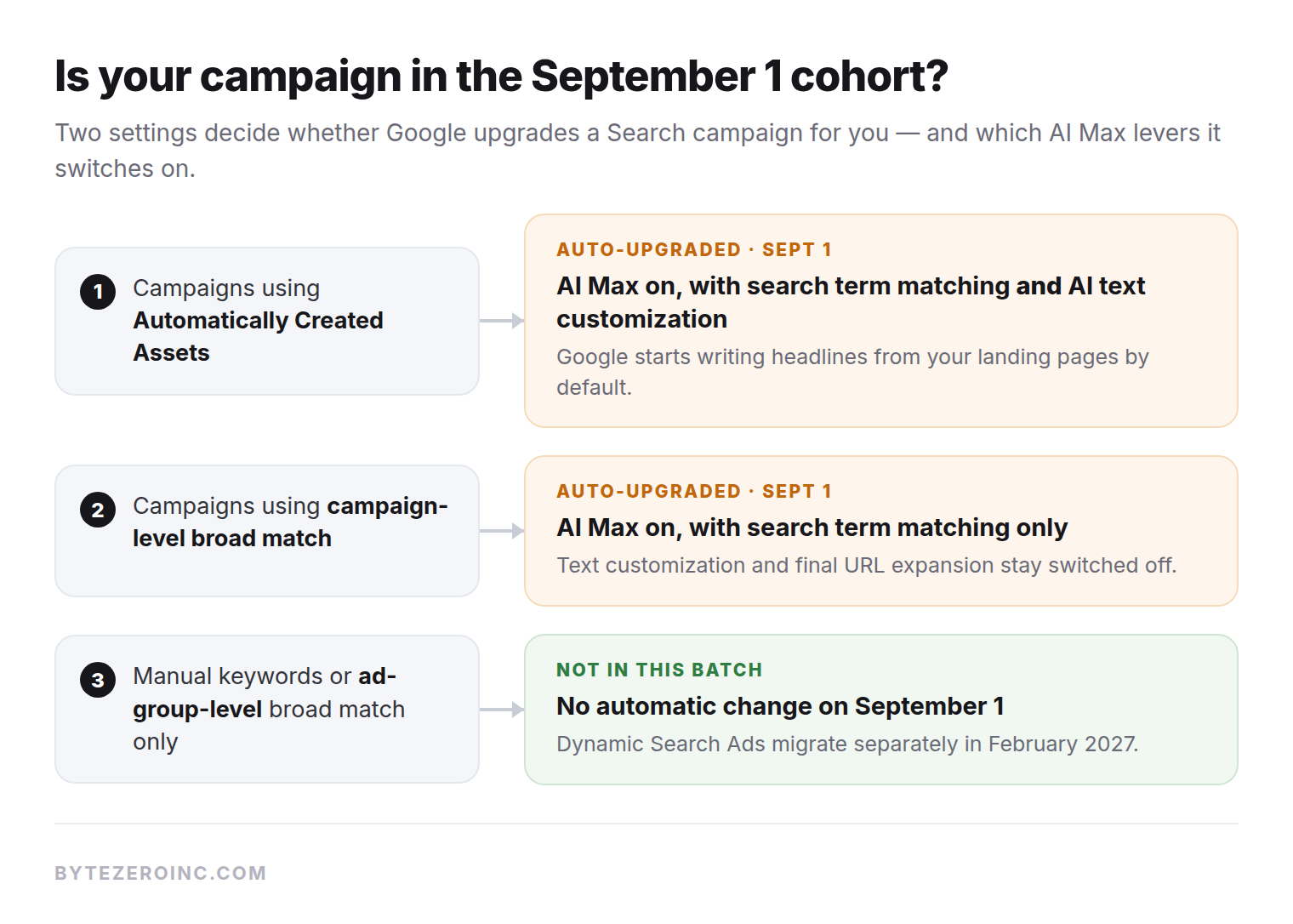
In plain text: campaigns running Automatically Created Assets are upgraded with search term matching and text customization both switched on. Campaigns running campaign-level broad match are upgraded with search term matching on, while text customization and final URL expansion stay off. Campaigns using only manual keywords or ad-group-level broad match are not in this batch at all.
That last distinction matters more than most summaries admit. The update applies to the campaign-level broad match toggle, not to ordinary broad match keywords inside an ad group, and Dynamic Search Ads migrate separately in February 2027. If you are not sure which of your campaigns qualify, that is step one of the playbook below, and it takes about twenty minutes. Google's own rollout note is summarised here.
What AI Max Actually Does
AI Max for Search bundles three capabilities, and each one changes a different part of how your budget gets spent.
Search term matching. Google's models reach beyond your keyword list to queries they predict are relevant, interpreting your landing pages and creative assets as targeting signals. That can surface demand you would never have thought to target. It can also spend real money on near-miss intent you never wanted.
Text customization. Google generates headlines and descriptions on the fly from your landing pages and existing assets. Sometimes they are sharper than what you wrote. Sometimes they are claims you would never have approved. Either way they ship under your brand name, which makes the asset report required weekly reading rather than an occasional curiosity.
The controls. Brand inclusions and exclusions, URL controls, and expanded search terms reporting. These are the difference between AI Max as a growth tool and AI Max as an unsupervised spending program — and they do not configure themselves.
Why You Should Not Wait for the Auto-Migration
When Google upgrades campaigns automatically, it applies system defaults designed for maximum eligibility. For your account, broader query eligibility and automated creative assembly introduce three specific risks.
Wasted spend on low-intent queries. Search term matching relies on AI interpretations of your landing pages and ad copy, which can pull in category-adjacent terms that consume budget without converting. In California CPC ranges, "category-adjacent" is a five-figure annual line item. Which outcome you get depends almost entirely on your negative keyword discipline, and on whether anyone is actually reading the search terms report each week. We went through what the keyword auction really costs in a separate breakdown, and the spread inside a single keyword is wider than most advertisers assume.
Unchecked ad copy generation. Text customization writes headlines from whatever it can read on your site. If your landing pages carry stale offers, old pricing or vague positioning, the model will happily promote all three.
Diluted performance signal. This is the risk almost nobody talks about. AI Max learns exclusively from your conversion data. If browser ad blockers and cookie restrictions are silently dropping a third of your conversions, the machine will optimise toward incomplete data with total confidence. Automation does not fix a measurement problem. It scales it.
The Five-Step Pre-Migration Playbook
Do not let Google flip the switch on default settings. These five steps work whether you end up adopting AI Max in September or deferring it.
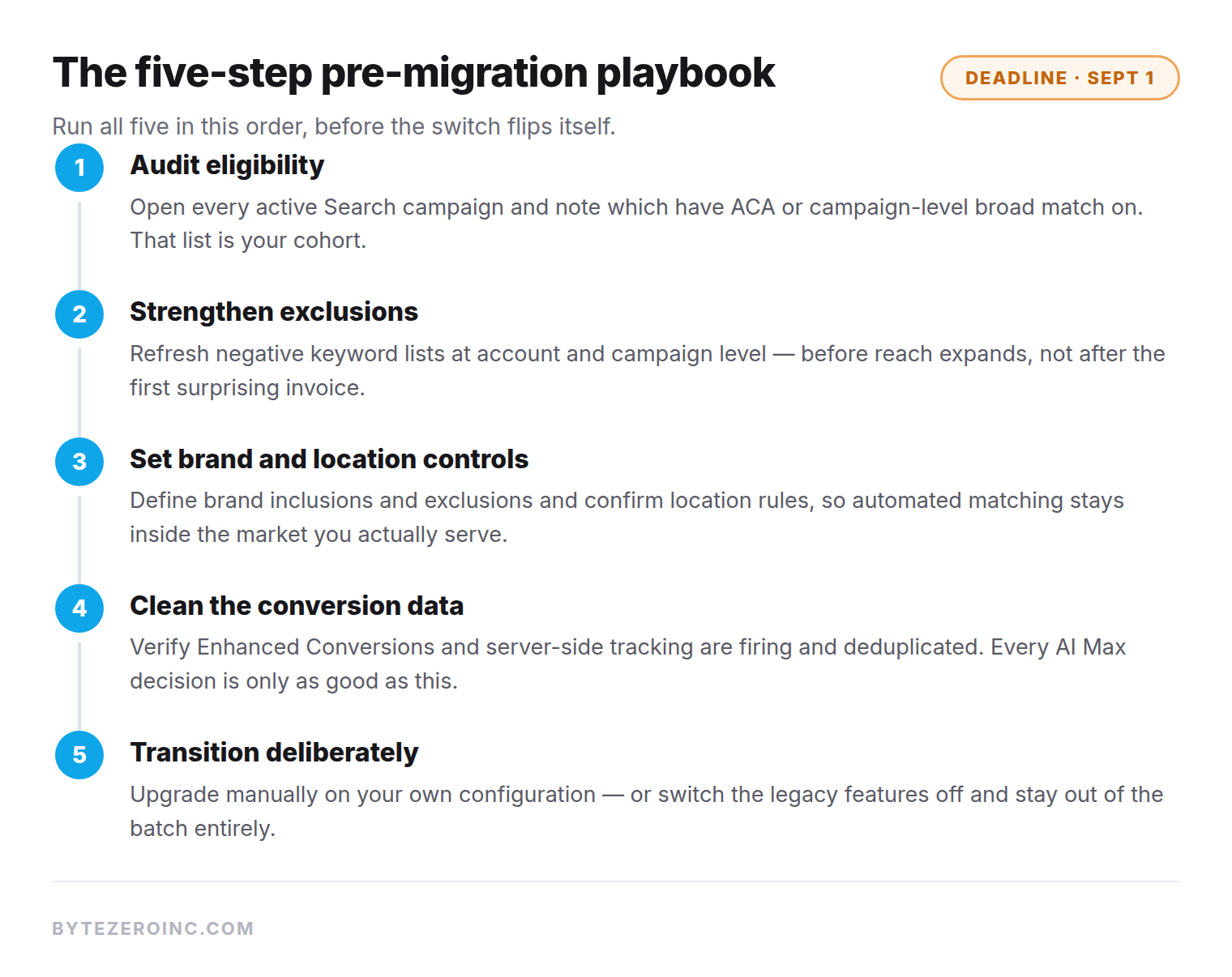
1. Audit account eligibility
Open every active Search campaign's settings and look for two things: the Automatically Created Assets toggle and the campaign-level broad match setting. Document which campaigns have either active, because those are your migration targets. If your current agency cannot produce that list within a day, that is a finding in itself.
2. Lock down brand and negative keyword lists
Search term matching expands reach beyond your explicit keywords, so your negatives become the fence line. Audit negative keyword lists at both campaign and account level, and add every brand-adjacent, competitor and low-intent term you want excluded from day one. Do this before the reach expands, not after the first surprising invoice.
3. Establish brand and location controls
AI Max respects brand inclusions and exclusions and location boundaries, provided you configure them. Define explicit brand guidelines and confirm your target location rules so automated matching stays grounded in your actual market. For a California business serving specific cities, a model happily expanding your eligible reach into markets you do not serve is pure waste dressed up as growth.
4. Feed the model clean conversion signals
AI Max optimises toward whatever conversion data it sees. Before upgrading, verify that Enhanced Conversions and server-side tracking are implemented, firing and deduplicated, so the model learns from your real customers rather than a partial browser-side sample. If you only do one technical task from this list, do this one. Every other AI Max decision is only as good as the data underneath it.
5. Transition deliberately, on your schedule
Instead of waiting for the automated rollout, use the upgrade banner in Google Ads to transition when you choose. Moving early lets you decide exactly which AI Max levers stay on or off — search term matching, text customization, final URL expansion — rather than accepting Google's default configuration. And if now is not the moment, switching off legacy ACA and campaign-level broad match before September 1 keeps you out of the auto-migration entirely. Both are legitimate choices. A silent September flip is not.
After the Switch: Judge It Like an Investment
Whichever path you choose, set the evaluation rules up front. Baseline your search terms, conversion rates and cost per customer now, screenshots included. Then review weekly: the search terms report, the asset combinations, and cost per actual customer against that baseline. Give the change four to six weeks of data before concluding anything, and if the extra reach is not producing profitable growth, cut it back as deliberately as you adopted it.
That measurement discipline — cost per customer by channel, not cost per click — is the backbone of how we run paid media alongside search engine optimization for California accounts. Channels compete for budget on equal, honest numbers, or the loudest dashboard wins.
Frequently Asked Questions
Will my historical campaign data be lost during the upgrade?
No. Upgrading to AI Max, whether manually or automatically, preserves your historical performance data, learning history and existing keyword structures.
We only use manual keywords and never enabled ACA. Are we affected?
Not by this migration. But the direction of travel is unmistakable: Google is consolidating Search features into AI Max. The deliberate-adoption question is when, not whether.
What if I want to opt out of AI Max completely?
Turn off legacy Automatically Created Assets and disable the campaign-level broad match setting before September 1, and your campaigns stay out of this migration. Treat opting out as a deferral rather than a strategy, and use the time to get your measurement in order.
How does AI Max differ from traditional broad match?
Traditional broad match expands queries based on keyword semantics. AI Max search term matching combines keyword signals with machine learning grounded in your landing pages, creative assets and real-time user context. Broader, smarter, and far more dependent on your controls being configured correctly.
Will AI Max lower our cost per lead?
Sometimes. The honest answer is that it depends on your controls, your negatives, and whether you measure cost per customer or stop at cost per lead. Any vendor promising a guaranteed outcome from a Google migration is selling confidence, not data.
Know Where You Stand Before September 1
A free ByteZero account audit maps which of your campaigns are in the September 1 upgrade cohort, what the migration would change, where your budget is leaking today, and what your real cost per customer is by channel.
Three weeks is plenty of time to move deliberately. It is not enough time to wait.